 North
Daily Jigsaw Puzzle and the 1000-Day Campaign in Amber Puzzle
Amber Puzzle gives you a fresh jigsaw without spending stars in two ways. The daily puzzle is a new free picture every day, and the six previous days stay available. The campaign is a chain of 1000 numbered days played in order: day 1 is open, and finishing a day unlocks the next one straight away. There is no timer, so you can play several campaign days in a row.
How to play the daily puzzle
- Tap the calendar icon in the bar at the bottom of the home screen. The tab is called DAILY PUZZLES.
- The big card is today's picture. It carries the Today badge with the date and the Free badge. Tap PLAY.
- Choose the piece count with the 16, 32, 64 or 128 chips and tap PLAY again.
- Missed a day? Scroll to Earlier days: the six previous daily puzzles are listed with their dates, and each of them is free as well.
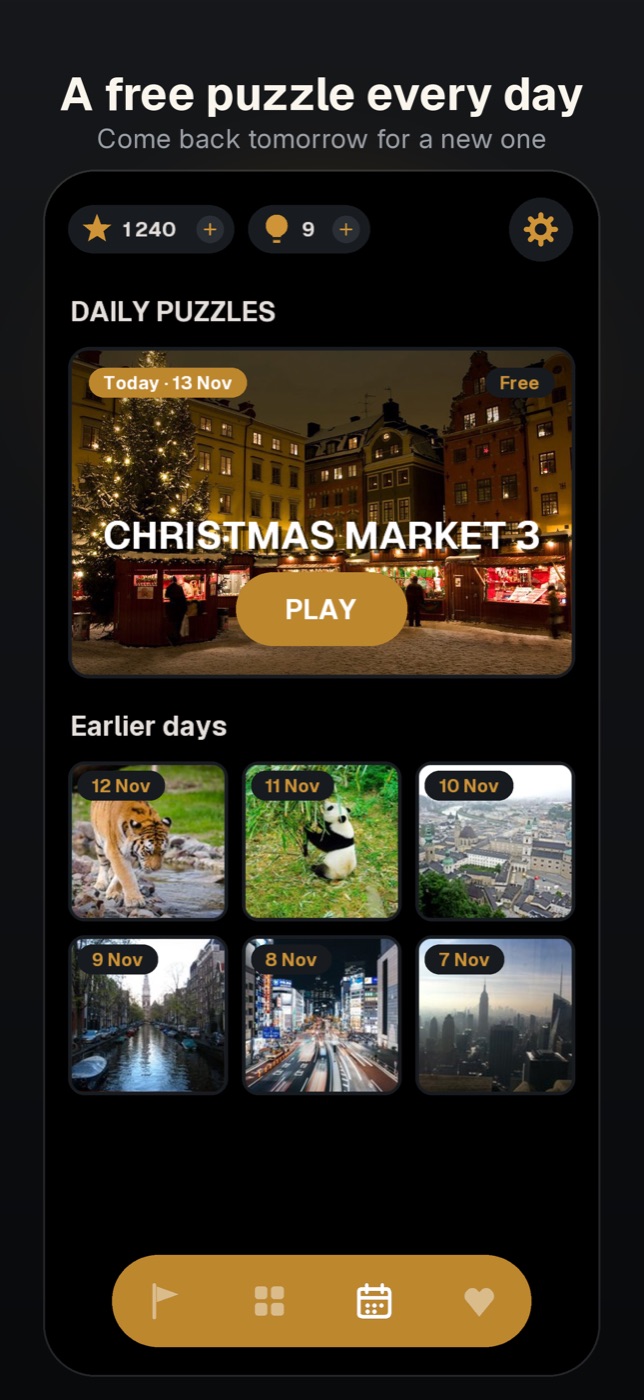
The day changes with the date on your device. A daily puzzle pays the same reward as any other puzzle of that size, and a finished one gets a check mark on its thumbnail.
How to play the campaign
- Tap the flag icon, the first one in the bottom bar. This is the tab the game opens on.
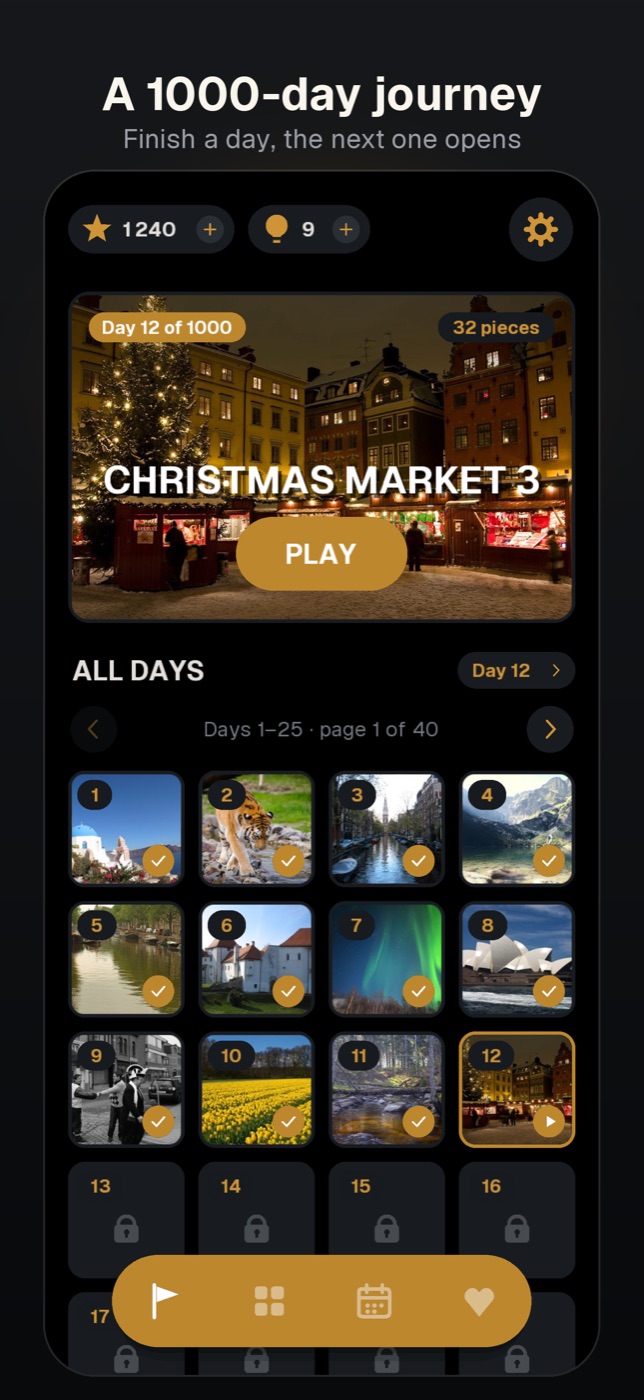
- The card at the top shows where you are, for example Day 12 of 1000, and the piece count of that day. Tap PLAY.
- On the next screen the heading names the day (DAY 12 and the picture's title). The day's own piece count is already selected. You may tap another chip: the campaign offers 32, 64 and 128. Then tap PLAY.
- Solve the puzzle. On the PUZZLE COMPLETED! screen tap COLLECT or DOUBLE. Back on the campaign tab, the card already shows the next day.
How to unlock the next day
There is one rule: finish the open day. It costs no stars and needs no ad. In the ALL DAYS grid, finished days show their picture with a check mark, the open day has an amber outline and a play mark, and the days ahead are numbered locks. Tapping a locked day only shows the message Finish day N first.
The grid holds 25 days per page. The arrows flip pages (Days 1–25 · page 1 of 40), and the Day N pill on the right brings you back to the day you are on.
The piece count grows along the way. At the time of writing, days 1–50 are set to 32 pieces, days 51–75 to 64, and from day 76 the campaign plays with 128.
Tips
- A finished day can be solved again at any time. Replaying it does not change your place in the campaign.
- An unfinished day is saved like any other puzzle. Tap the card again and choose CONTINUE in the UNFINISHED PUZZLE dialog.
- If a 128-piece day feels too long, tap the 32 or 64 chip before you start. The day still counts as finished; only the reward is smaller.
- Both modes come from the internet. Without a connection the tab shows a note that the content will appear once the server is reachable.
- Achievements follow your streaks: Daily Habit for 7 daily puzzles, First Week, A Month In and Centurion for 7, 30 and 100 campaign days. Find them under the gear icon, in Achievements.
Do I have to wait until tomorrow for the next campaign day?
No. A campaign "day" is a level number, not a calendar date. The next day opens the moment you finish the current one.
What happens if I miss a daily puzzle?
It moves to Earlier days and stays there, still free, for six more days.
Where is my campaign progress stored?
On your device; the game has no accounts. Reset progress in the settings erases the campaign together with stars, hints and saved games, and this cannot be undone.
Amber Puzzle is a game by NorthAlliance.